New: Zlarp Spoof for Mac & Windows →

Be anywhere.
Instantly.

Zlarp Spoof sets your phone’s GPS to any spot on earth. Teleport in one tap, or walk, drive and fly there along real routes. No jailbreak, no root. On iPhone, Android, Mac and Windows.

iOS 17.4+Android 8+Mac & WindowsLicense on 2 devices
9:41
Spoofing25.1414, 55.185312:34
Burj Al Arab
Dubai · The 7-star hotel
25.141390, 55.185280
Teleport Here
Travel
Teleport
Walk
Cycle
Drive
Fly
iPhone
9:41
RICH SPOTS
Villas & MansionsPenthousesHotels & Suites
VILLAS & MANSIONS
🇮🇳
AntiliaMumbai · $2B tower home
🇫🇷
Villa La LéopoldaVillefranche · The Riviera’s grandest estate
🇫🇷
Villa Les CèdresCap Ferrat · Sold for €200M
🇺🇸
ChartwellBel Air · Sold for $150M
PENTHOUSES
🇺🇸
220 Central Park SouthNew York · $238M penthouse
MonacoMykonosMiami
qwertyuiop
asdfghjkl
⇧zxcvbnm⌫
?123,English.🔍
Android
Where to next?
🇮🇳 Antilia🇫🇷 Villa La Léopolda🇫🇷 Villa Les Cèdres🇺🇸 Chartwell🇺🇸 The One🇺🇸 Playboy Mansion🇫🇷 Domaine de la Capilla🇺🇸 The Manor🇬🇧 Witanhurst🇺🇸 220 Central Park South🇲🇨 Tour Odéon🇬🇧 One Hyde Park🇺🇸 One57🇦🇪 Atlantis The Royal🇦🇪 Burj Al Arab🇦🇪 Emirates Palace🇲🇨 Hôtel de Paris🇫🇷 Hôtel du Cap-Eden-Roc🇫🇷 Ritz Paris🇺🇸 Hotel Bel-Air🇲🇨 Port Hercule🇲🇨 Casino Square🇫🇷 Billionaires' Quay🇮🇹 Porto Cervo🇧🇱 Gustavia🇫🇷 Club 55🇬🇷 Nammos🇬🇷 Scorpios🇫🇷 Chalet Edelweiss🇨🇭 Badrutt's Palace🇨🇭 Gstaad Palace🇺🇸 The Little Nell🇺🇸 Fisher Island🇻🇬 Necker Island🇻🇨 Mustique
See it in action

Watch it take you anywhere.

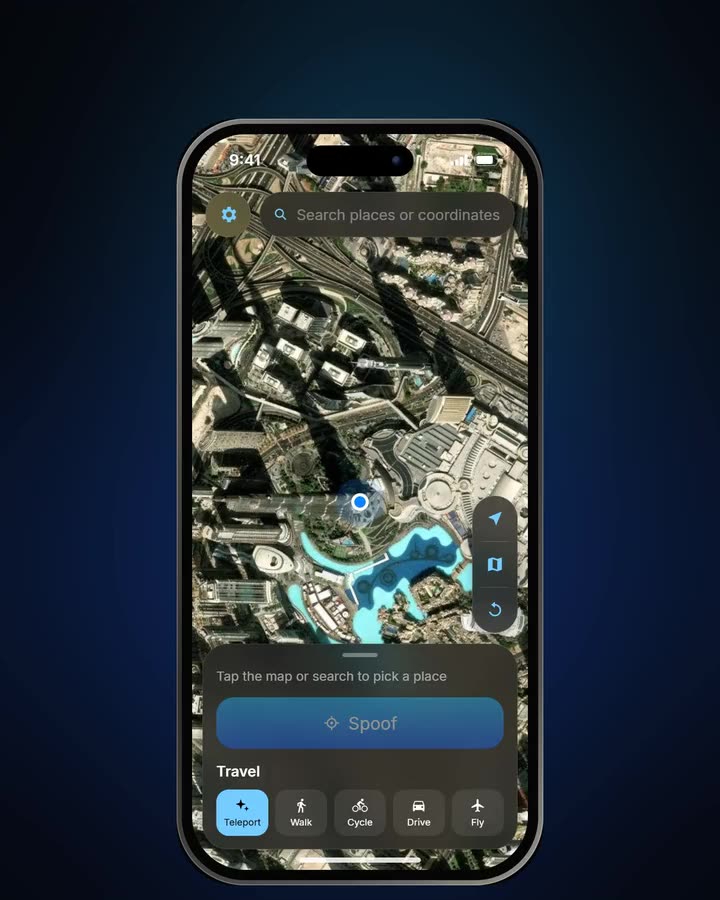
Teleport to a Rich Spot, paste coordinates, fly across the world or drive real roads. This is the app, exactly as you’ll use it.

Live demo

Try it right here.

This iPhone runs the app on a real map. Pick a Rich Spot, choose Walk or Fly, and tap Spoof.

  1. 1Pick a place. Tap the search bar and choose a Rich Spot, type an address, or paste coordinates. Or just tap the map.
  2. 2Choose how to get there. Teleport jumps straight there. Walk, Cycle and Drive follow real roads, Fly takes the great-circle route.
  3. 3Tap Spoof. Watch the dot travel: the covered route turns solid, the rest stays dotted. Trips run sped up in the demo.
  4. 4Go home. The red stop button or the reset button on the map brings you back to your real location.

Map data © OpenStreetMap contributors · Tiles by OpenFreeMap · Satellite © Esri

How it works

From your sofa to Monaco
in four taps.

01 · Pick a place

35 Rich Spots, any address, any coordinates.

Tap the empty search bar for the Rich Spots, type an address, paste coordinates in any format, or simply tap the map.

02 · Walk there

Real roads, at a human pace.

Walk, Cycle and Drive follow real routes. The road you’ve covered turns solid, the rest stays dotted, and the pace varies slightly like a real person’s.

03 · Or fly

Across the world at 850 km/h.

Fly follows the great-circle path, like a real plane, with its own speed slider from 100 to 1000 km/h.

04 · Go home

Back to reality in one tap.

Reset clears the simulated location, and the map flies back to where you really are.

RICH SPOTS
Villas & MansionsPenthousesHotels
PENTHOUSES
🇺🇸
220 Central Park SouthNew York · $238M penthouse
🇲🇨
Tour OdéonMonaco · World’s priciest penthouse
🇬🇧
One Hyde ParkLondon · Knightsbridge’s top address
HOTELS & SUITES
🇦🇪
Atlantis The RoyalDubai · $100K-a-night suite
🇦🇪
Burj Al ArabDubai · The 7-star hotel
🇦🇪
Emirates PalaceAbu Dhabi · A palace you can sleep in
Spoofing25.1366, 55.19094:18
Walking · 6m 40s left540 m
5 km/hBurj Al Arab
Walk Here
Spoofing55.0412, -12.66302:41:07
Flying · 4h 5m left3,470 km
850 km/h220 Central Park South
850 km/h
Spoofing25.1414, 55.185312:34
Burj Al Arab
Dubai · The 7-star hotel
Reset to your real location?Stops spoofing and clears the simulated location on this iPhone.
Reset Location
Cancel
9:41
Teleport to

Monaco.

Superyachts in Port Hercule, one tap away.

Photo: Wikimedia Commons
Teleport to

Dubai.

Breakfast at the Burj Al Arab. Without the flight.

Photo: Wikimedia Commons
Teleport to

Necker Island.

Branson’s private island, on your map in seconds.

Photo: Wikimedia Commons
35Rich Spots
5Travel modes
2Platforms
0Computers needed
Features

Your location,
your rules.

Everything happens on the phone itself, through the system’s own location service. Every app sees the same spot.

Five ways to get there

Teleport instantly with an Apple Maps–style fly-to and ping, or travel along real road routes at a natural, slightly varying pace. Fly follows the great-circle path, like a real plane.

Teleport instantWalk 5 km/hCycle 18 km/hDrive 50 km/hFly 850 km/h

Multi-stop routes

Tap stops on the map and run them Once, on a Loop or Back & Forth. Covered ground draws solid, the road ahead in dots.

Rich Spots

35 hand-picked places where only VIPs go, from Monaco penthouses to private islands. One tap.

Search & coordinates

Find any place or address, or paste coordinates in any format.

Runs in the background

Keeps going while you use other apps, with a live timer in the panel.

System-wide

Every app sees
the same spot.

Zlarp Spoof changes the location the phone itself reports, so anything that asks for your location gets the new one.

  • No per-app setup. Set it once, every app follows.
  • Maps, social, dating, delivery, fitness and everything else that uses location.
  • Moves live. Walk, drive or fly and every app sees you travel.
Google Maps📍 Monaco
Snapchat📍 Monaco
Tinder📍 Monaco
WhatsApp📍 Monaco
Instagram📍 Monaco
TikTok📍 Monaco
Uber Eats📍 Monaco
Strava📍 Monaco
🇲🇨Monaco43.7344, 7.4208

App names and logos are trademarks of their owners. Zlarp Spoof isn’t affiliated with or endorsed by them; respect each app’s terms.

Compare

Everything in one app.

How Zlarp Spoof stacks up against the usual ways to change your location.

BestZlarp SpoofDesktop location toolsFake GPS apps
Works without a computer
No jailbreak or root
iPhone and AndroidSomeAndroid only
Desktop app for Mac and Windows
Walk, cycle and drive along real roadsSomeSome
Fly mode with airliner speedsRareRare
Multi-stop routes with Loop and Back & ForthSomeSome
Natural GPS drift while standing stillSomeSome
35 checked luxury spots built in
Paste coordinates in any formatSomeSome
Every platform

Your phone and your computer.

The same app on iPhone, Android, Mac and Windows. One license key works on two devices, in any mix. Only the one-time setup differs.

iPhone

iOS 17.4 or later
  1. Install the IPA and turn on Developer Mode.
  2. Install LocalDevVPN; the app opens it when needed.
  3. Tap Pair This iPhone in Settings. No computer.

Android

Android 8 or later
  1. Download and install the APK.
  2. Turn on Developer options.
  3. Pick Zlarp Spoof as the mock location app.

Mac & Windows

macOS 11+ · Windows 10 and 11
  1. Install the app and paste your license key.
  2. Plug your iPhone in with a USB cable and tap Trust.
  3. Turn on Developer Mode; the app does the rest.
Full setup guide →
Your license

One key.
Two devices.

Buy a key on zlarp, paste it in the app and it unlocks straight away.

  • 2 devices per key, any mix of iPhone, Android, Mac and Windows.
  • Switch phones any time: free a device with Reset devices on your zlarp key page.
  • Keeps working offline for about a day after the last key check.
Zlarp SpoofLicense key
● Active
ZLRP-7QX4K-M2V9D-H8T3P-W5N6C
Devices2 of 2
PlatformsiPhone · Android
Zlarp Spoof icon

Go somewhere new today.

35 Rich Spots and every address on earth. iPhone, Android, Mac and Windows, one key for two devices.